● Free during preview · Windows 10 & 11
Screenshots you can share without worry
Press a hotkey, drag, and annotate right where you selected. Pixshot blurs emails, card numbers and API keys in one click — and tells you who leaked a screenshot.
Instant capture
The screen freezes the moment you press your hotkey. Hover to grab a whole window or a single control.
Annotate in place
The toolbar sits beside your selection. Boxes, arrows, steps, text and blur — no separate editor window.
Share safely
Redact sensitive details in one click, and watermark what you send so a leak can be traced.
How it works
From hotkey to a clean, safe screenshot in seconds
Every image on this page is Pixshot's own interface, captured from the app.
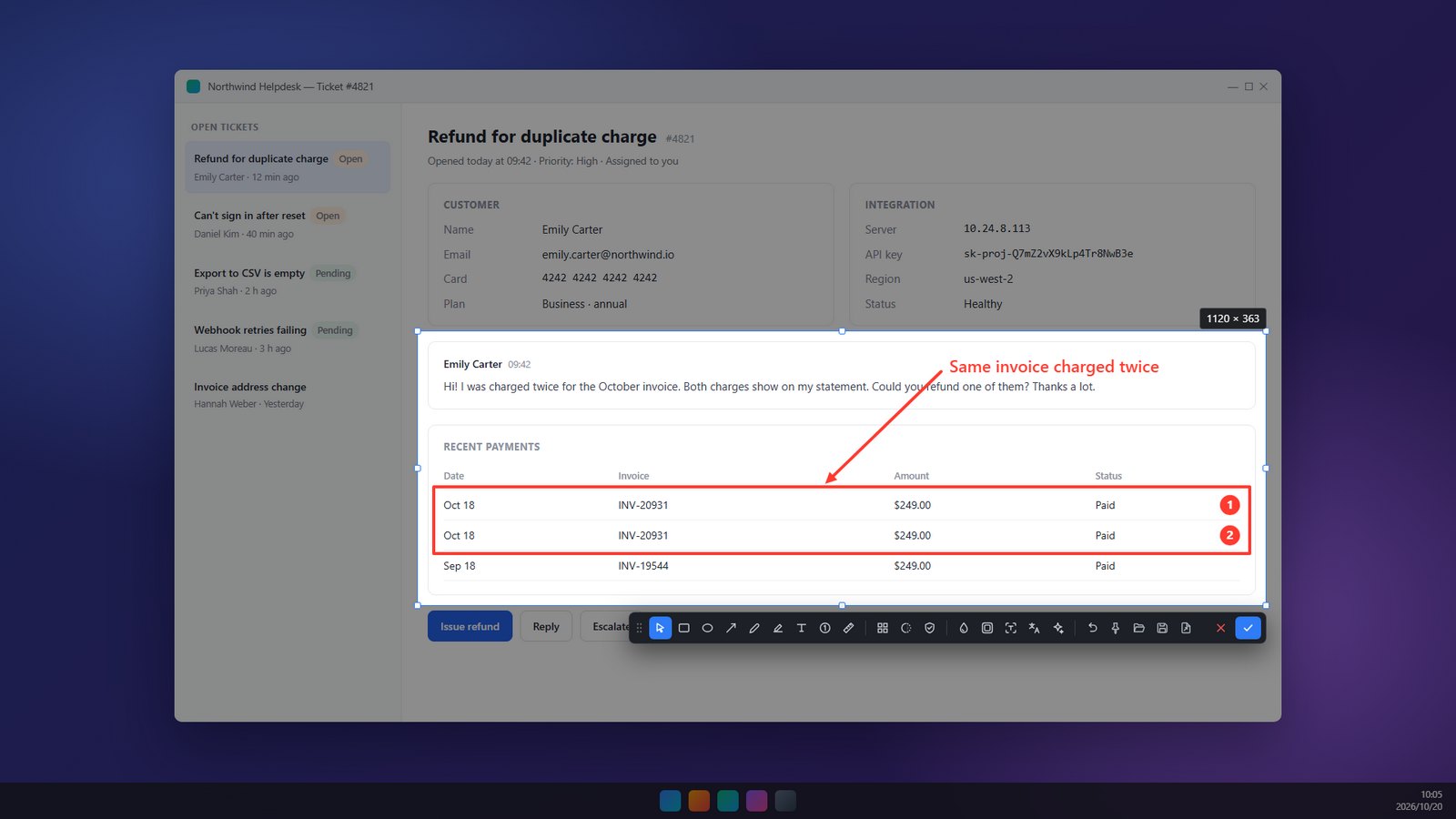
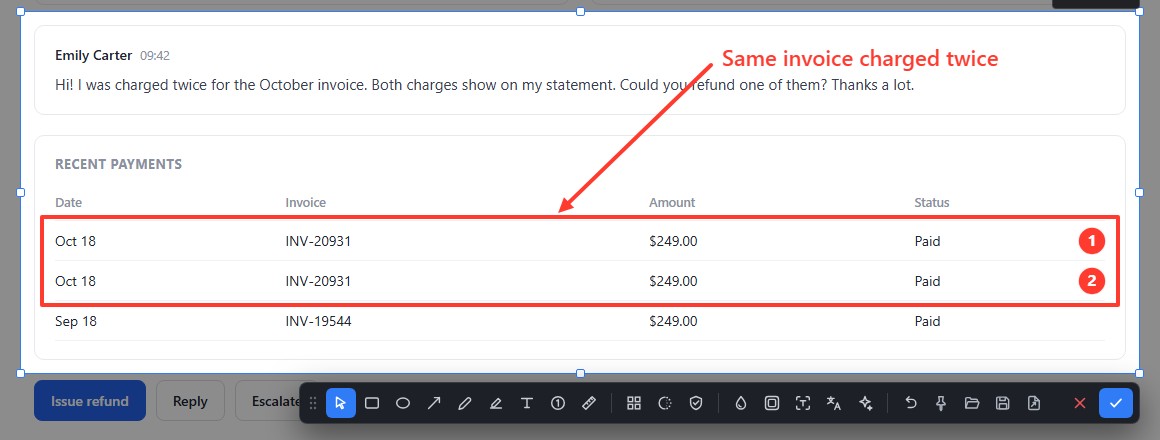
Select, then mark it up right there
Let go of the mouse and the toolbar is already next to your selection. Draw, then copy or save in one step.
- Rectangles, arrows, pen, highlighter, text and numbered steps
- Resize the selection after annotating — nothing shifts
- Arrow keys nudge the selection pixel by pixel
Pro · free during preview
One click hides what shouldn't be shared
Pixshot reads the text in your selection with the recognition built into Windows — offline — and covers only the sensitive values, not the labels around them.
- Emails, card numbers (checksum-verified) and IP addresses
- API keys and tokens: OpenAI, GitHub, AWS, Google, Slack and more
- One undo brings everything back

Pro · free during preview
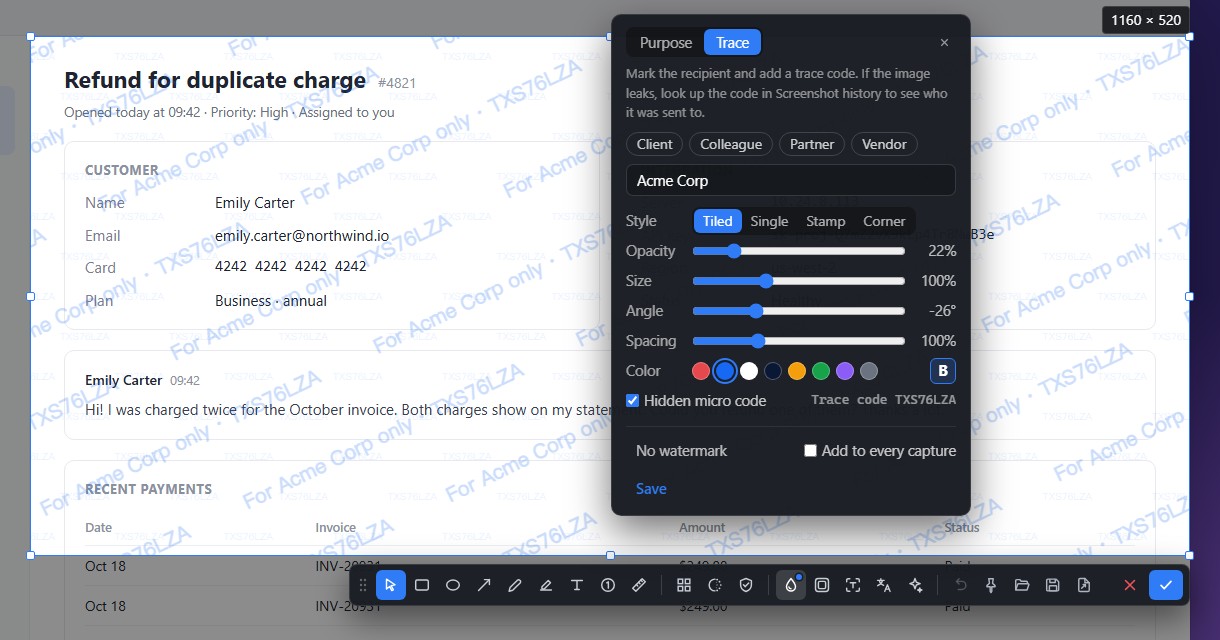
Know exactly who leaked it
Mark a screenshot for its recipient. Every copy carries a trace code plus a faint micro-code tiled across the image that survives cropping. If it turns up somewhere it shouldn't, search the code in your history.
- Tiled, single, stamp or corner styles
- Or a simple label like "Internal use only"
- Save presets, or add one to every capture
Grab a window — or one control inside it
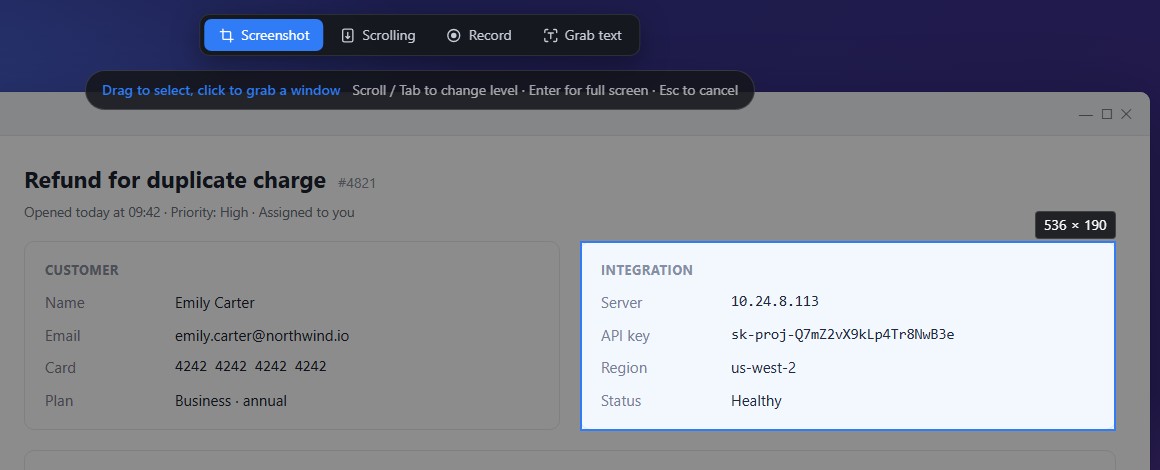
Hover and Pixshot highlights the window or control under your cursor. Click to capture it exactly. Scroll or press Tab to step between control, window and full screen.
- Works across multiple monitors and mixed scaling
- Switch to scrolling capture, recording or grab-text from the top bar
And more
Everything a daily screenshot tool needs
Scrolling captureCapture long pages and chats as you scroll, with a live preview of the stitch.
Pin to screenKeep a screenshot on top as a reference, with opacity control and click-through.
Grab textRecognize text in any capture offline, edit it, and copy it out.
Ask AIExplain an error, translate, pull out a table or turn a UI into code — with your own AI provider.
Screen recordingMP4 or GIF with click highlights, keystroke display and a webcam overlay.
BeautifyGradient background, rounded corners and a shadow, ready for docs and social posts.
HistoryRecent captures are kept automatically — even an annotated one you cancelled by mistake.
Copy as filePaste a capture straight into chat apps or File Explorer as a file.
Four languagesEnglish, 简体中文, 繁體中文 and 日本語, following your system.
Your screenshots stay on your PC
We don't run servers that collect your data, and Pixshot has no telemetry. Read the full privacy policy.
- No account, no tracking
- No sign-in, no usage statistics, no crash reports sent anywhere.
- Offline text recognition
- Redaction and grab-text use the OCR built into Windows. Nothing is uploaded.
- AI only when you ask
- Only the capture you send to Ask AI goes out — straight to the provider you chose, with your own key.
Pricing
Every feature is free during the preview
Paid plans will be a one-time purchase, never a subscription. We'll announce them here and in the app first.
Free
$0
For personal use, forever
- Capture, annotate, pin and beautify
- Scrolling capture
- Offline text recognition
- Manual blur and pixelate
- Screenshot history
Pro
$0during preview
Planned: $9.90 one-time
- Everything in Free
- One-click redaction
- Trace watermarks
- Screen recording to MP4 and GIF
- Ask AI and translate
Need it for your company? A commercial license is planned at $19.90 per user.
FAQ
Questions
Is Pixshot really free?
Yes. During the preview every feature, including Pro, is free. The Free edition stays free for personal use after that, and Pro will be a one-time purchase.
Does Pixshot upload my screenshots?
No. Captures, history and settings stay on your PC. The only time a screenshot leaves it is when you send that capture to Ask AI or Translate, and it goes directly to the AI provider you configured. See the privacy policy.
Which systems are supported?
Windows 10 (version 1809 or later) and Windows 11, 64-bit. Showing the capture screen before grabbing it — the fastest mode — needs Windows 10 version 2004 or later.
How do I start a capture?
Press the capture hotkey (Ctrl+Shift+A by default — you can change it), or click the tray icon. If another app already uses your hotkey, Pixshot suggests free combinations you can switch to with one click.
What does Ask AI need?
Your own API key from a provider such as Anthropic, OpenAI, DeepSeek, Alibaba Qwen or Zhipu, or any OpenAI-compatible endpoint. Keys are encrypted on your PC.
Get Pixshot
Pixshot is coming to the Microsoft Store, with automatic updates and a one-click install.
Microsoft Store — coming soon
Windows 10 & 11 · 64-bit · Free during preview